Explanation
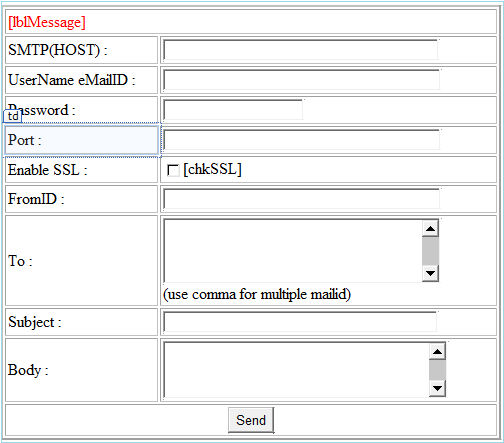
Sending email using Asp.net is simple thing but I cannot forget my first task.Because am a fresher without knowing about dotnet I started my carrer, the first task is email sending using asp.net .Ok let me come to the point, here am trying to explain how to send the same email details to multiple receipents, One way this code will helpful for monthly news letters sending and checking.Also we may easily check the email configuration setting through this.First we may design the screen as mentioned below.
Design
Coding
Output
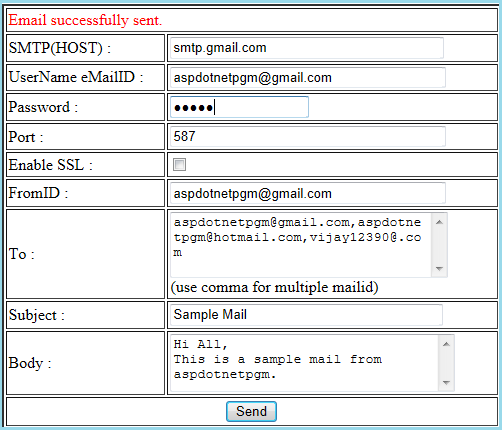
Here I mentioned the gmail smtp configuration for sending the email for multiple users, you may give your email id and password and try the same.
In this post I tried to explain how to Send email to multiple recipient in Asp.net.
Sending email using Asp.net is simple thing but I cannot forget my first task.Because am a fresher without knowing about dotnet I started my carrer, the first task is email sending using asp.net .Ok let me come to the point, here am trying to explain how to send the same email details to multiple receipents, One way this code will helpful for monthly news letters sending and checking.Also we may easily check the email configuration setting through this.First we may design the screen as mentioned below.
Design

<table cellpadding="2" cellspacing="2" border="2" align="center" width="500px">
<tr>
<td colspan="2"><asp:Label ID="lblMessage" runat="server" ForeColor="Red"></asp:Label></td>
</tr>
<tr>
<td>SMTP(HOST) :</td>
<td><asp:TextBox ID="txtsmtp" runat="server" Width="268px"></asp:TextBox></td>
</tr>
<tr>
<td>UserName eMailID :</td>
<td><asp:TextBox ID="txtFromUID" runat="server" Width="270px"></asp:TextBox></td>
</tr>
<tr>
<td>Password :</td>
<td><asp:TextBox ID="txtPwd" runat="server" Width="133px" TextMode="Password"></asp:TextBox></td>
</tr>
<tr>
<td>Port :</td>
<td><asp:TextBox ID="txtPort" runat="server" Width="270px"></asp:TextBox></td>
</tr>
<tr>
<td>Enable SSL :</td>
<td><asp:CheckBox ID="chkSSL" runat="server" /> </td>
</tr>
<tr>
<td>FromID :</td>
<td><asp:TextBox ID="txtFromID" runat="server" Width="270px"></asp:TextBox></td>
</tr>
<tr>
<td>To :</td>
<td><asp:TextBox ID="txtTo" runat="server" Width="272px" Height="60px"
TextMode="MultiLine"></asp:TextBox><br />(use comma for multiple mailid)</td>
</tr>
<tr>
<td>Subject :</td>
<td><asp:TextBox ID="txtSubject" runat="server" Width="267px"></asp:TextBox></td>
</tr>
<tr>
<td>Body :</td>
<td><asp:TextBox ID="txtBody" runat="server" Width="279px" Height="52px"
TextMode="MultiLine"></asp:TextBox></td>
</tr>
<tr align="center">
<td colspan="2"><asp:Button ID="btnSubmit" runat="server" Text="Send"
onclick="btnSubmit_Click" /> <asp:Button ID="btnClear" runat="server" Text="Clear"
onclick="btnClear_Click" /></td>
</tr>
</table>
Coding
using System.Net.Mail;


    public void Clear()
        {
            txtTo.Text = "";
            txtSubject.Text = "";
            txtsmtp.Text = "";
            txtPwd.Text = "";
            txtPort.Text = "";
            txtFromID.Text = "";
            txtBody.Text = "";
        }

    protected void btnClear_Click(object sender, EventArgs e)
        {
       Clear();

    }

        protected void btnSubmit_Click(object sender, EventArgs e)
        {
            lblMessage.Text = string.Empty;
            SmtpClient smtpClient = new SmtpClient();
            MailMessage message = new MailMessage();

            try
            {
                MailAddress fromAddress = new MailAddress(txtFromID.Text, "");
                //Provide smtp Host name
                smtpClient.Host = txtsmtp.Text;
                //made default credential as false
                smtpClient.UseDefaultCredentials = false;
                //Here pass the login from emailID and Password
                smtpClient.Credentials = new System.Net.NetworkCredential(txtFromUID.Text, txtPwd.Text);
                //Port is important, default port is 25.
                smtpClient.Port = (txtPort.Text.Trim() == string.Empty) ? 25 : Convert.ToInt32(txtPort.Text.Trim());

                //From email Id
                message.From = fromAddress;
                //Subject which we are going to send
                message.Subject = txtSubject.Text.Trim().Replace("'","");
                //Whether we are going to send body content as plain text/HTML format here i am going to use plain text so i kept html false
                message.IsBodyHtml = false;

                if ((txtTo.Text != null) && (txtTo.Text != string.Empty))
                {
                    //Here we are splitting the email ID by comma separated
                    string[] emailTo = txtTo.Text.Split(',');

                    foreach (string emails in emailTo)
                    {

                        if (emails.Trim().Length > 0)
                        {
                            //Add the To email id in Mail to List
                            message.To.Add(new MailAddress(emails));

                        }
                    }
                }

                // Message body content
                message.Body = txtBody.Text.Trim().Replace("'", "");

                //If SSL is enabled we have check the enable SSL true
                if (chkSSL.Checked)
                {
                    smtpClient.EnableSsl = true;
                }
                // Send SMTP mail
                smtpClient.Send(message);

                Clear();
                lblMessage.Text = "Email successfully sent.";

            }
            //Here am using smtp exception original mail exception able to catch
            catch (SmtpException ex)
            {
                lblMessage.Text = "Email sending Failed." + ex;
            }
            catch (Exception ex)
            {
                lblMessage.Text = "Email sending Failed." + ex;
            }
        }
Output
Here I mentioned the gmail smtp configuration for sending the email for multiple users, you may give your email id and password and try the same.

In this post I tried to explain how to Send email to multiple recipient in Asp.net.

